매일 아침 IT 뉴스 체크하는 루틴, 있으신 분 많죠?
Hacker News 열고, GeekNews 열고, The Verge 열고…
탭이 10개 넘어가는 순간 이미 피곤해요.
근데 생각해보면 이거 다 RSS 피드가 있거든요.
긁어오면 되는 거잖아요. 자동으로.
그래서 만들었어요. Python Flask로 RSS 수집기 하나 올려두고, 매일 아침 자동으로 글감을 모아두는 시스템을요.
이전 글: [서버, 인프라] - Ubuntu 서버에 Claude Code 도커로 올리기 1편
뭘 만드는 건지 먼저 그림 잡기
구조 자체는 단순해요.
매일 05:00 crontab 실행
↓
collector.py → 여러 RSS 소스 수집
↓
data/ 폴더에 JSON 저장
↓
Flask 웹에서 목록 확인
↓
"오늘 수집 데이터 복사" 버튼 클릭
↓
Claude.ai에 붙여넣기
DB 없어요. JSON 파일로 저장해요.
처음엔 "이게 맞나?" 싶었는데, 솔직히 이 정도 규모에선 DB가 오버스펙이거든요.
파일로 충분해요.
프로젝트 구조
web-scrap-note/
 ├ app.py
 ├ crawler/
 │   └ collector.py       ← 멀티 소스 통합 수집
 ├ templates/
 │   ├ index.html         ← 수집 목록 + 복사 버튼
 │   └ detail.html        ← 상세 보기
 ├ data/                  ← 수집된 JSON 저장
 ├ requirements.txt
 └ Dockerfile
파일 수 적죠? 이게 포인트예요.
복잡하게 만들수록 나중에 안 써요.
1단계 — 패키지 설치
# requirements.txt
flask==3.0.0
feedparser==6.0.10
딱 두 개예요.
feedparser는 RSS XML을 파싱해주는 라이브러리예요. 직접 XML 파싱 안 해도 되니까 코드가 엄청 짧아지거든요.
pip install -r requirements.txt
2단계 — RSS 수집기 만들기 (collector.py)
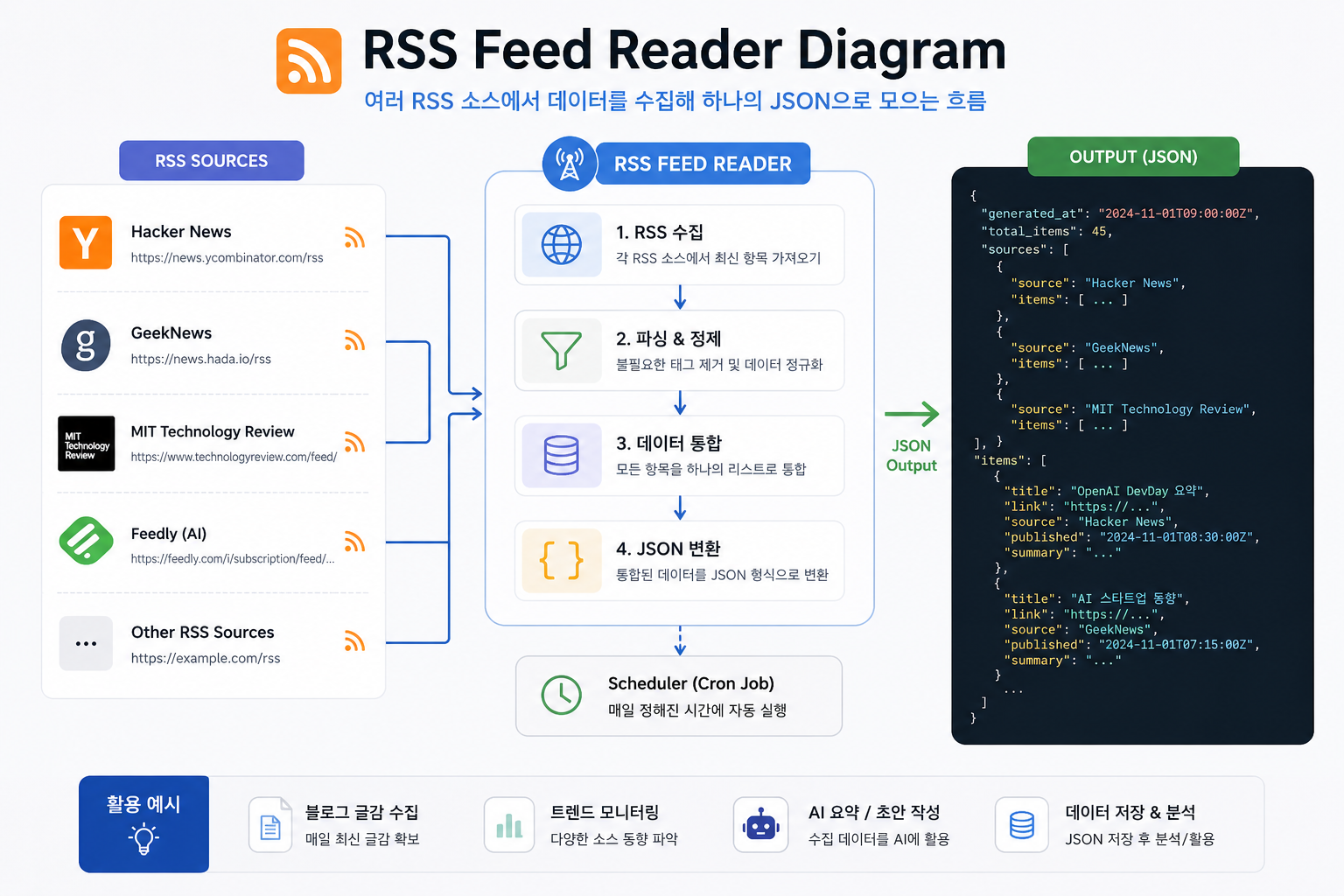
수집 소스는 이렇게 구성했어요.
카테고리 소스
| IT/개발 | Hacker News, GeekNews |
| AI | MIT Technology Review, The Verge AI |
| 커뮤니티 | Dev.to, Reddit r/programming |
소스별로 상위 10개씩, 중복 URL은 제거해요.
실제 코드예요.
# crawler/collector.py
import feedparser
import json
import os
from datetime import datetime

SOURCES = [
    {"name": "hackernews",          "url": "https://news.ycombinator.com/rss"},
    {"name": "geeknews",            "url": "https://news.hada.io/rss"},
    {"name": "mit_tech",            "url": "https://www.technologyreview.com/feed/"},
    {"name": "theverge",            "url": "https://www.theverge.com/ai-artificial-intelligence/rss/index.xml"},
    {"name": "devto",               "url": "https://dev.to/feed"},
    {"name": "reddit_programming",  "url": "https://www.reddit.com/r/programming/.rss"},
]

DATA_DIR = os.path.join(os.path.dirname(__file__), "..", "data")


def fetch_source(source):
    try:
        feed = feedparser.parse(source["url"])
        items = []
        for entry in feed.entries[:10]:
            items.append({
                "title":      entry.get("title", "").strip(),
                "url":        entry.get("link", ""),
                "summary":    entry.get("summary", "")[:300].strip(),
                "source":     source["name"],
                "created_at": datetime.now().strftime("%Y-%m-%dT%H:%M:%S"),
            })
        print(f"[OK] {source['name']} — {len(items)}개 수집")
        return items
    except Exception as e:
        print(f"[SKIP] {source['name']} — {e}")
        return []


def collect():
    os.makedirs(DATA_DIR, exist_ok=True)

    all_items = []
    seen_urls = set()

    for source in SOURCES:
        for item in fetch_source(source):
            if item["url"] and item["url"] not in seen_urls:
                seen_urls.add(item["url"])
                all_items.append(item)

    today = datetime.now().strftime("%Y%m%d")
    filename = f"{today}_{len(all_items):03d}.json"
    path = os.path.join(DATA_DIR, filename)

    with open(path, "w", encoding="utf-8") as f:
        json.dump(all_items, f, ensure_ascii=False, indent=2)

    print(f"\n저장 완료: {filename} ({len(all_items)}개)")


if __name__ == "__main__":
    collect()
어? 생각보다 짧죠?
feedparser가 RSS 파싱을 다 처리해줘서, 우리는 필요한 필드만 뽑으면 돼요.
수집 실패한 소스는 그냥 skip하고 넘어가거든요. 하나 터진다고 전체가 멈추면 안 되니까요.
3단계 — Flask 웹 서버 만들기 (app.py)
웹에서 수집 결과를 보고, "오늘 데이터 복사" 버튼 한 번으로 Claude.ai에 붙여넣을 수 있게 만들어요.
# app.py
import os
import json
from flask import Flask, render_template, jsonify
from datetime import datetime

app = Flask(__name__)
DATA_DIR = "data"


def load_today_items():
    today = datetime.now().strftime("%Y%m%d")
    items = []
    for fname in sorted(os.listdir(DATA_DIR), reverse=True):
        if fname.startswith(today) and fname.endswith(".json"):
            with open(os.path.join(DATA_DIR, fname), encoding="utf-8") as f:
                items = json.load(f)
            break
    return items


def load_all_files():
    files = []
    for fname in sorted(os.listdir(DATA_DIR), reverse=True):
        if fname.endswith(".json"):
            files.append(fname)
    return files


@app.route("/")
def index():
    files = load_all_files()
    today_items = load_today_items()
    return render_template("index.html", files=files, today_items=today_items)


@app.route("/api/today")
def api_today():
    items = load_today_items()
    return jsonify(items)


if __name__ == "__main__":
    app.run(host="0.0.0.0", port=5000, debug=False)
4단계 — 오늘 데이터 복사 버튼 만들기
이게 사실 제일 자주 쓰는 기능이에요.
버튼 하나 누르면 이런 형식으로 클립보드에 복사돼요.
=== 오늘의 IT 이슈 (2025-06-01) ===
[1] 제목
요약: ...
링크: ...
소스: hackernews

[2] 제목
요약: ...
...
이걸 그대로 Claude.ai에 붙여넣고 "오늘 쓸만한 주제 추천해줘" 하면 끝이거든요.
index.html에 JavaScript로 구현해요.
<!-- templates/index.html 핵심 부분 -->
<button onclick="copyToday()">오늘 수집 데이터 복사</button>

<script>
async function copyToday() {
  const res = await fetch("/api/today");
  const items = await res.json();
  const today = new Date().toISOString().split("T")[0];

  let text = `=== 오늘의 IT 이슈 (${today}) ===\n\n`;
  items.forEach((item, i) => {
    text += `[${i + 1}] ${item.title}\n`;
    text += `요약: ${item.summary}\n`;
    text += `링크: ${item.url}\n`;
    text += `소스: ${item.source}\n\n`;
  });

  await navigator.clipboard.writeText(text);
  alert("복사 완료!");
}
</script>
5단계 — crontab으로 매일 자동 수집
서버에서 매일 오전 5시에 자동 실행돼요.
# crontab -e
0 5 * * * docker exec web-scrap-note python crawler/collector.py >> /opt/scrap-data/cron.log 2>&1
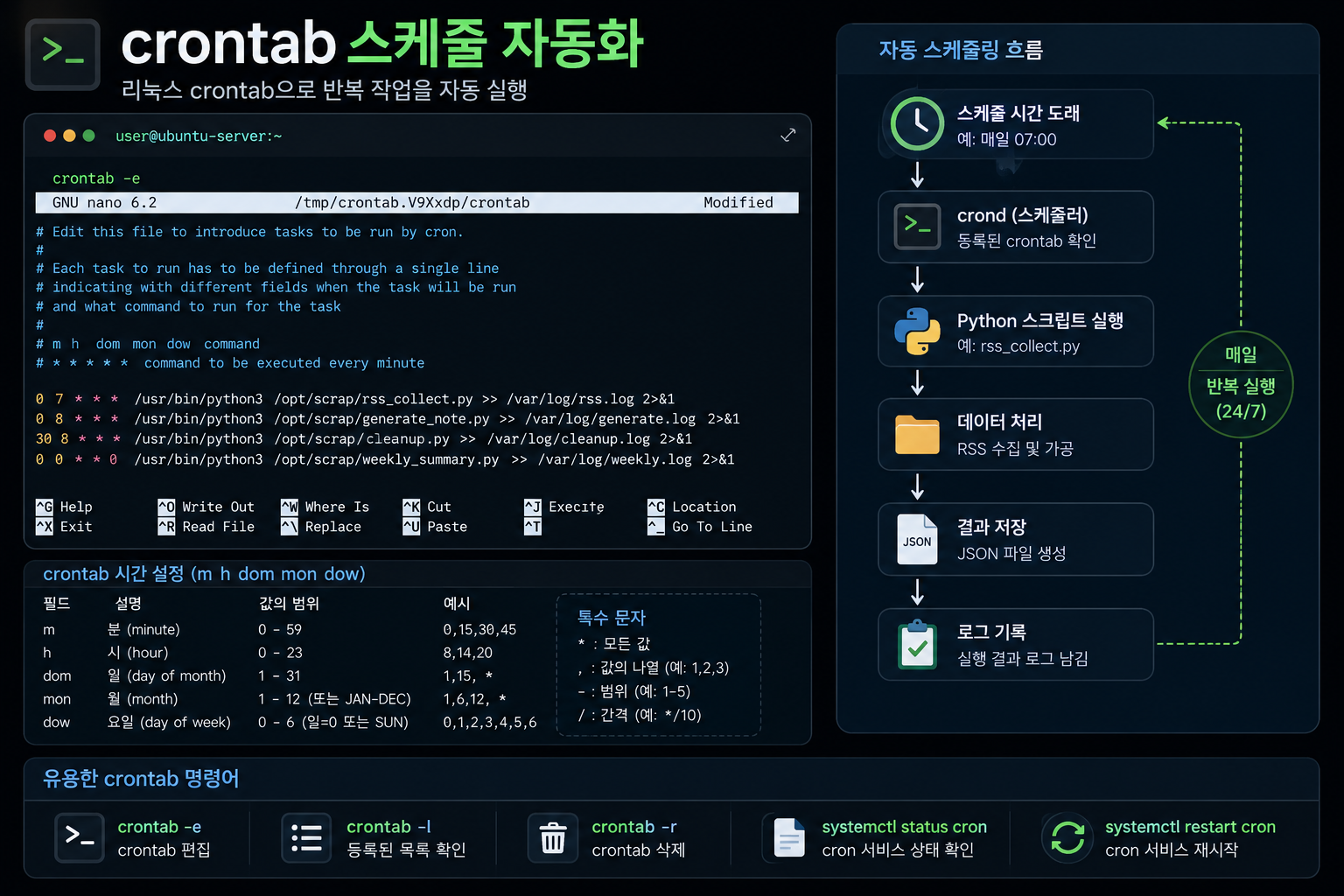
여기서 포인트가 있어요.
docker exec으로 컨테이너 안에서 직접 실행하는 거거든요.
호스트에 Python 깔 필요 없이, 컨테이너 환경 그대로 써요.
실제로 돌려보면
# 컨테이너 안에서 직접 테스트
docker exec web-scrap-note python crawler/collector.py
[OK] hackernews — 10개 수집
[OK] geeknews — 10개 수집
[OK] mit_tech — 8개 수집
[OK] theverge — 10개 수집
[OK] devto — 10개 수집
[OK] reddit_programming — 10개 수집

저장 완료: 20250601_058.json (58개)
58개. 매일 이 정도 글감이 쌓여요.
다 쓸 필요는 없고, 그중에 눈에 띄는 거 하나 골라서 Claude.ai한테 던지는 거예요.
근데 여기서 반전이 있어요
수집은 잘 되는데, 처음 며칠은 막상 안 써요.
"오늘은 별로 없네" 하고 탭 닫는 거거든요.
그게 쌓이면 3일치, 5일치가 돼요.
오히려 그게 낫더라고요. 주제 고를 때 선택지가 많아지거든요.
자동화의 진짜 가치는 "매일 수집"이 아니라 "내가 안 봐도 쌓여있다" 는 거예요.
여기까지 정리하면
Flask + feedparser로 RSS 수집기 만들었고, 웹에서 바로 복사해서 Claude.ai에 붙여넣는 흐름까지 완성됐어요.
다음 편에서는 Jenkins로 이 프로젝트를 자동 배포하는 파이프라인을 만들어요.
코드 push 하면 → 자동 빌드 → 컨테이너 재시작까지.
한 번 설정해두면 이후에 코드 고칠 때마다 손 안 대도 되거든요.
결국 핵심은 이거예요.
글감 수집은 서버한테 맡기고, 나는 쓰는 것에만 집중한다.
'개발' 카테고리의 다른 글
| 서버 디스크가 꽉 찼을 때 — 도커 이미지부터 정리하자 (0) | 2026.09.23 |
|---|---|
| 은행 API가 개인정보를 흘린다면, 제일 먼저 볼 4곳 (0) | 2026.07.19 |
| Docker에서 Claude Code, Codex 승인 계속 물어볼 때 해결 방법 (0) | 2026.06.09 |


